
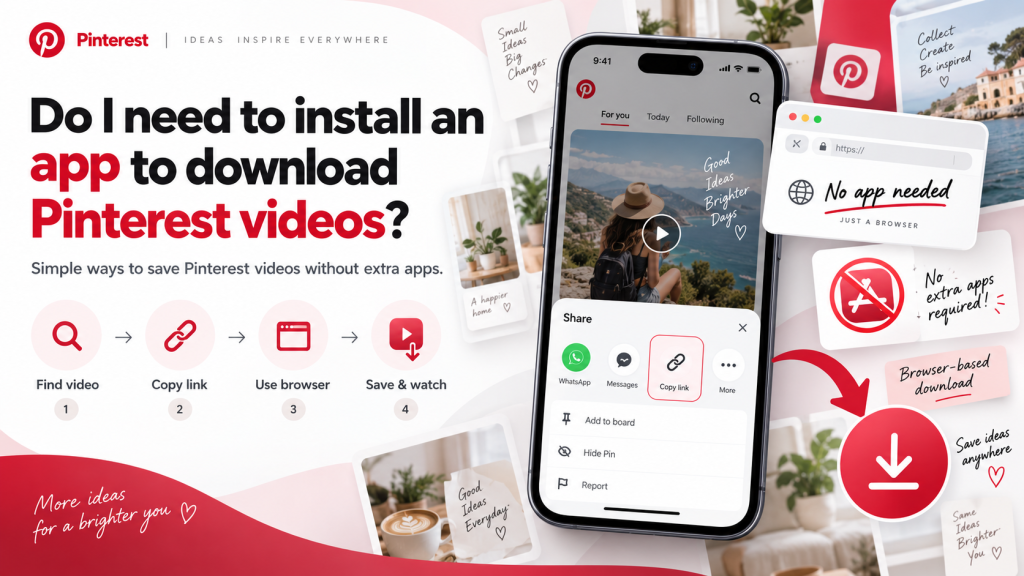
Pinterest is a useful platform for discovering recipes, tutorials, fashion ideas, travel inspiration, DIY projects, and creative videos. When users find a video they want to keep for later, they often wonder whether downloading it requires installing another application. In many cases, an extra app is not necessary because browser-based tools can handle the process directly.
Pinterest Video Download can usually be completed through an online downloader that works inside a mobile or desktop browser. Users simply copy a Pinterest video link, paste it into the tool, and save the available video without installing additional software, creating an account, or using complicated technical steps.
Can Pinterest Videos Be Downloaded Without an App?
Yes, many Pinterest videos can be downloaded without installing a dedicated application. Browser-based downloaders are designed to work through modern browsers such as Chrome, Safari, Firefox, Edge, and other compatible options on phones, tablets, laptops, and desktop computers.
These tools usually only need the public Pinterest video URL to locate and process the content. Once the link has been analyzed, the website may provide a downloadable version of the video, although availability and quality will depend on the original Pinterest source and the downloader being used.
How Browser-Based Downloading Works
The process is usually simple and only involves a few basic steps. First, open Pinterest and find the video you want to save, then open the pin fully and use the share option to copy its link.
Next, open your preferred web browser and visit a suitable Pinterest video downloader. Paste the copied URL into the provided field and select the available processing or download button.
The tool will analyze the link and look for an available video file. If the video is supported, you can choose the available quality and save the file directly to your device without installing a separate application.
Why Many Users Prefer Online Tools
One of the biggest advantages of browser-based downloading is convenience. You do not need to search an app store, install software, create an account, or give another application permanent access to your device.
Online tools can also help save storage space because there is no extra app taking up memory on your phone or computer. This can be especially useful for users with older devices or limited storage capacity.
Another benefit is flexibility. A browser-based downloader may work across Android phones, iPhones, tablets, laptops, and desktops, allowing users to follow almost the same process regardless of the device they are using.
Browser Downloader vs Dedicated App
Both browser-based tools and dedicated apps can be useful, but they serve slightly different needs. Occasional users often prefer online tools, while people who download videos frequently may want extra features offered by an application.
| Option | Main Advantage | Possible Drawback |
|---|---|---|
| Browser-based downloader | No installation required | Requires internet and a compatible website |
| Dedicated app | May offer extra features | Uses storage and may request permissions |
| Browser extension | Quick desktop access | Requires installation in the browser |
For most users who only want to save an occasional Pinterest video, a browser-based downloader is often the simpler and more practical option.
Do Android Users Need a Separate App?
In most cases, Android users can download Pinterest videos using only a mobile browser. After copying the Pinterest video link, open Chrome, Firefox, Edge, or another trusted browser and paste the URL into a compatible online downloader.
Once the download is complete, the video will usually appear in the Downloads folder, File Manager, Gallery, or Google Photos. The exact location can vary depending on your phone model, browser settings, and storage preferences.
Installing a dedicated app may be optional rather than necessary. Unless you need advanced features such as download history or batch processing, a browser-based tool can often handle the basic task effectively.
Can You Download Pinterest Videos on iPhone Without an App?
Yes, iPhone users can also use browser-based downloaders without installing an additional application. Copy the Pinterest video link, open Safari or another supported browser, and paste the URL into a compatible downloader.
After processing the video, select the available download option. Safari usually stores downloaded files inside the Downloads section of the Files app, where you can open and manage them afterward.
If the file format is supported, you may also be able to use the iOS share menu and select Save Video to move the file into Photos. The exact steps can vary slightly depending on the iOS version and browser settings.
Are Downloading Apps Better Than Websites?
Not always. Dedicated apps may offer useful features such as download history, file organization, faster access, or the ability to manage multiple videos in one place, but they also require storage space and may request additional permissions.
Browser-based tools are usually simpler for occasional use because nothing needs to be installed or maintained. You can open the website when needed, process the video link, and close the browser after the download is complete.
The better option depends on how often you download videos and which features matter most to you. If you only save content occasionally, an online tool may be enough for your needs.
What Should You Check Before Installing an App?
If you decide to install a dedicated downloader, review it carefully before giving it access to your device. Check the developer information, user reviews, update history, permissions, and privacy details available in the app store.
Be cautious if the app requests access to contacts, messages, location, microphone, or other information that has nothing to do with video downloading. A downloader should not normally need excessive access to your personal data.
You should also avoid applications that ask for your Pinterest password without a clear and legitimate reason. Choosing well-reviewed software from a trusted source can help reduce security and privacy risks.
Advantages of Avoiding Extra Applications
Using a browser instead of installing another app can keep your device cleaner and easier to manage. You save storage space and avoid unnecessary background processes, notifications, automatic updates, and additional permissions.
This can be particularly helpful for users with limited phone storage or older devices that may slow down when too many applications are installed. Browser-based tools can be opened only when needed and do not remain permanently on the device.
Another advantage is accessibility. The same online downloader may work on several devices, so you do not need to install separate software each time you switch from a phone to a tablet or computer.
Common Issues With Browser Downloads
Although browser-based downloading is convenient, problems can still occur. A Pinterest link may be incomplete, private, deleted, or temporarily unavailable, which can prevent the downloader from finding the video.
Some tools may also stop processing certain Pinterest links because of technical or compatibility changes. If a download fails, copy the video URL again, refresh the browser, or try another trusted downloader.
It is also important to make sure your device has enough free storage and a stable internet connection. Larger or higher-quality files are more likely to fail if the connection is interrupted during the download.
Stay Safe When Using Online Downloaders
A trustworthy downloader should generally only require the Pinterest video URL. Avoid websites that ask for passwords, banking information, unnecessary personal details, or permission to install unknown software before processing a basic public video link.
Be careful with misleading download buttons, aggressive pop-ups, suspicious redirects, and automatic file downloads. If a website downloads an unfamiliar file type without your permission, avoid opening it until you are sure it is safe.
Keeping your browser and operating system updated can also improve security. Checking that downloaded videos use familiar formats such as MP4 can help reduce the risk of opening unwanted files.
Remember Copyright and Content Ownership
Downloading a Pinterest video does not transfer ownership of the content to you. Videos may belong to individual creators, photographers, brands, businesses, designers, or other copyright holders who retain rights over their original work.
Saving content for personal offline viewing is different from reposting, editing, selling, or using it commercially. If you plan to reuse downloaded content publicly, review the creator’s permissions and relevant copyright rules first.
Respecting ownership helps support original creators and encourages responsible use of digital content, regardless of whether the video was downloaded through a website or an application.
Conclusion
Pinterest Video Download does not usually require you to install an additional app. In many cases, a reliable browser-based downloader can process a public Pinterest video link and save the available file directly to your phone, tablet, laptop, or computer without extra software.
Pinterest video downloads should still be handled with care, whether you choose a website or an application. Use trusted tools, avoid unnecessary permissions, protect your personal information, and respect the copyright of original creators. For most occasional users, a browser-based solution provides a simple and practical way to save Pinterest videos.